WordPress powers over 40% of all websites on the internet, and its flexibility is one of the main reasons for its widespread adoption. One feature that has significantly expanded WordPress’s capabilities is its REST API a tool that allows developers to connect WordPress with other applications, services, and systems.
In this guide, we will explain what the WordPress REST API is, how it works, why it matters, and how it can be used to power modern digital experiences.
What Is the WordPress REST API?
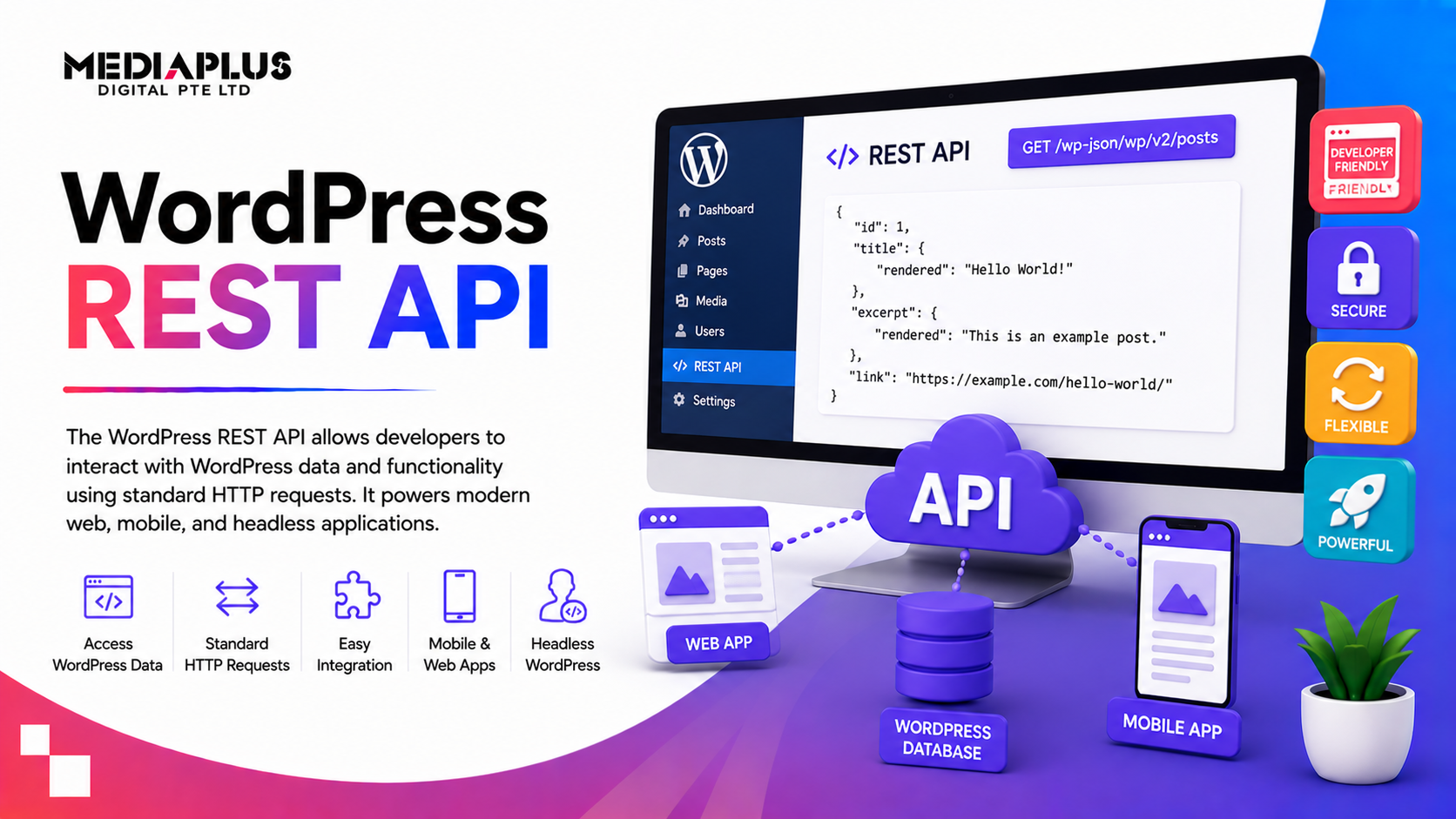
The WordPress REST API is a set of HTTP endpoints that expose WordPress content and functionality in a way that other applications can interact with. REST stands for Representational State Transfer, a set of rules for building APIs that are scalable, flexible, and easy to use.
Through the REST API, external applications can:
- Retrieve content like posts, pages, and media
- Create, update, or delete content programmatically
- Authenticate and manage users
- Integrate WordPress with other tools, dashboards, or services
The API follows standard HTTP methods such as GET (to read data), POST (to create data), PUT / PATCH (to update), and DELETE (to remove), making it compatible with almost any programming language or system.
Check more: What API Integration Is and Why Modern Businesses Rely On It
How Does the WordPress REST API Work?
At its core, the WordPress REST API exposes routes or endpoints. These endpoints are URLs that correspond to different resources such as posts, categories, users, and more. Requests to these endpoints return data in JSON format, a lightweight and widely used data interchange format.
For example:
GET https://yourwebsite.com/wp-json/wp/v2/posts
This simple request returns a list of published blog posts in JSON. From there, you can use the response data in apps, dashboards, other websites, or even IoT devices.
Under the hood, WordPress uses its built-in routing and permission systems to ensure API requests are handled securely and reliably.
Common Uses of the WordPress REST API
The REST API dramatically expands what is possible with WordPress. Here are some popular use cases:
Headless WordPress
One of the most transformative trends in modern development is the concept of headless CMS. In a headless setup, WordPress manages content, and a separate front-end framework (such as React, Vue, or Next.js) builds the user interface. The WordPress REST API delivers content to that front end.
This approach allows developers to build highly interactive user experiences that are fast, scalable, and decoupled from WordPress’s traditional templating system.
Mobile and Desktop Apps
Mobile apps for iOS and Android can use the REST API to pull content from WordPress. For example, a news app could show the latest posts, comments, and media without embedding a web view.
Cross-System Integrations
WordPress often needs to integrate with external systems such as CRMs, marketing automation tools, analytics platforms, or custom enterprise software. The REST API allows seamless two-way communication between WordPress and these systems.
E-commerce Workflows
Online stores using WooCommerce (built on WordPress) rely heavily on REST endpoints to manage products, orders, customers, and inventory in real time. This makes store data available for external dashboards, ERP systems, and fulfilment platforms.

Benefits of Using the WordPress REST API
Integrating with the WordPress REST API offers many advantages:
- Flexibility: Any language or platform that can make HTTP requests can use the API.
- Scalability: Decoupling the front end from the CMS allows for growth and advanced user experiences.
- Real-Time Interactions: Dynamic updates and integrations become possible without page reloads.
- Standardised Data: JSON payloads provide a predictable, structured format that is easy to consume.
- Improved Performance: Headless architectures and selective data fetching can result in faster user interfaces.
Getting Started With the WordPress REST API
To begin using the REST API, you don’t need plugins or custom code if your WordPress version is 4.7 or newer, the API is enabled by default.
Steps usually include:
- Identifying the endpoint you need (e.g., posts, users, custom post types)
- Crafting an HTTP request with the appropriate method (
GET,POST, etc.) - Handling JSON responses in your application
- Implementing authentication for endpoints that require secure access
Many developers use tools like Postman or code libraries (Axios, Fetch API, cURL) to test and integrate API requests during development.
Advanced Usage: Custom Endpoints and Authentication
While the default endpoints handle most content needs, you can create custom REST API endpoints for specialised workflows or protected data.
There are also multiple authentication methods available:
- Cookie authentication (for front-end requests in authenticated sessions)
- Application passwords (simplified token-based access)
- OAuth 2.0 / JWT (for secure integrations across systems)
These methods allow secure access while preserving the flexibility needed for more complex applications.
When You Need Professional API Integration Support
Understanding the basics of the WordPress REST API is valuable, but integrating it into a broader digital ecosystem can be complex. Many businesses today need WordPress to communicate with:
- Customer Relationship Management (CRM) systems
- Enterprise Resource Planning (ERP) platforms
- Marketing automation tools
- External databases
- Custom mobile or front-end applications
This is where expert support makes a difference.
If your project involves integrating WordPress with other cloud services, enterprise applications, or bespoke workflows, consider using a programmatic web API integration service.
provides Web API Integration solutions that help businesses connect WordPress with any external system reliably and securely. Whether you need to sync customer data, automate workflows, build headless architectures, or create custom endpoints to plug into third-party systems, MediaPlus can tailor an integration strategy based on your needs.
By combining the flexibility of the WordPress REST API with professional API integration expertise, you unlock far more than standard website capabilities. You gain a scalable digital platform that seamlessly fits into your broader technology stack.
Learn more about MediaPlus Digital’s Web API Integration services.
Conclusion
The WordPress REST API opens up remarkable possibilities for modern web development. It breaks the constraints of traditional CMS limitations and enables WordPress to become the content engine behind dynamic, data-driven applications.
Whether you are building headless websites, mobile apps, or cross-system integrations, mastering the REST API is a valuable step. And when your project requires complex workflows or enterprise-grade reliability, partnering with a professional API integration specialist can help ensure success.
With the right strategy, WordPress and its REST API become not just a content management solution but a powerful hub in your digital ecosystem.