You can track some of it, not all of it, and the part most people want is the part Google does not give you. Here is the honest position as of October 2026.
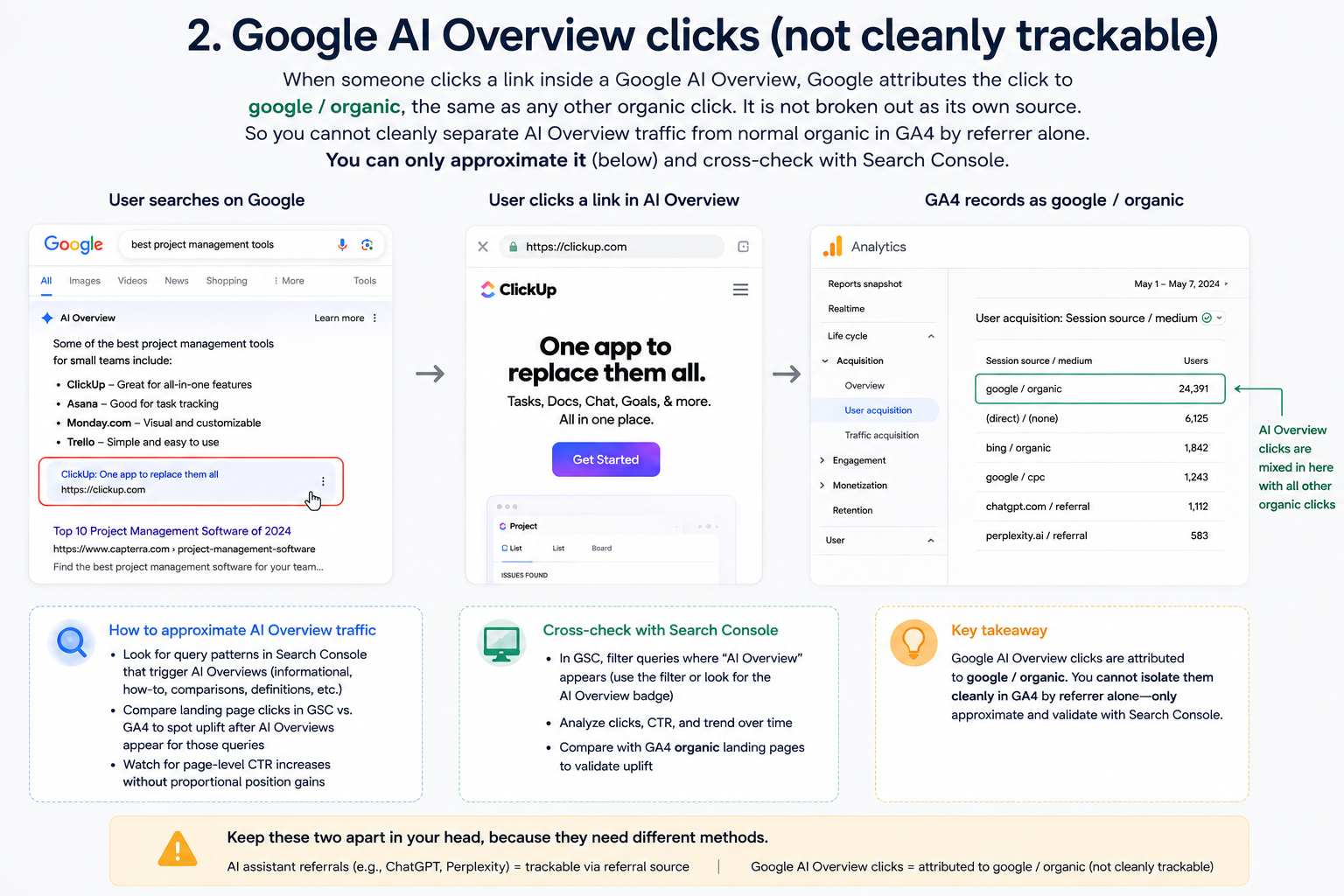
Clicks from Google’s AI Overviews and AI Mode land in GA4 as Organic Search. They are not separated out, and there is no setting that separates them. What you can do is see your AI Overview and AI Mode impressions in Search Console’s generative AI report, track referrals from AI assistants like ChatGPT and Perplexity in GA4, and reconcile the rest.
This guide covers what each tool shows, the exact setup for the parts that work, and what you genuinely cannot measure so you stop looking for it.
Can you see AI Overview traffic separately in GA4?
No, and it helps to understand why.
An AI Overview appears on a Google search results page. When someone clicks a link inside it, the referrer is still Google Search. GA4 sees google / organic and classifies it as Organic Search, exactly like a click on a blue link below.
Google has not added a parameter to distinguish the two. So in GA4, AI Overview clicks are mixed into your organic traffic with no marker. Anyone selling you a GA4 report that isolates AI Overview clicks is either using the text-fragment workaround covered below, which catches a minority of cases, or guessing.
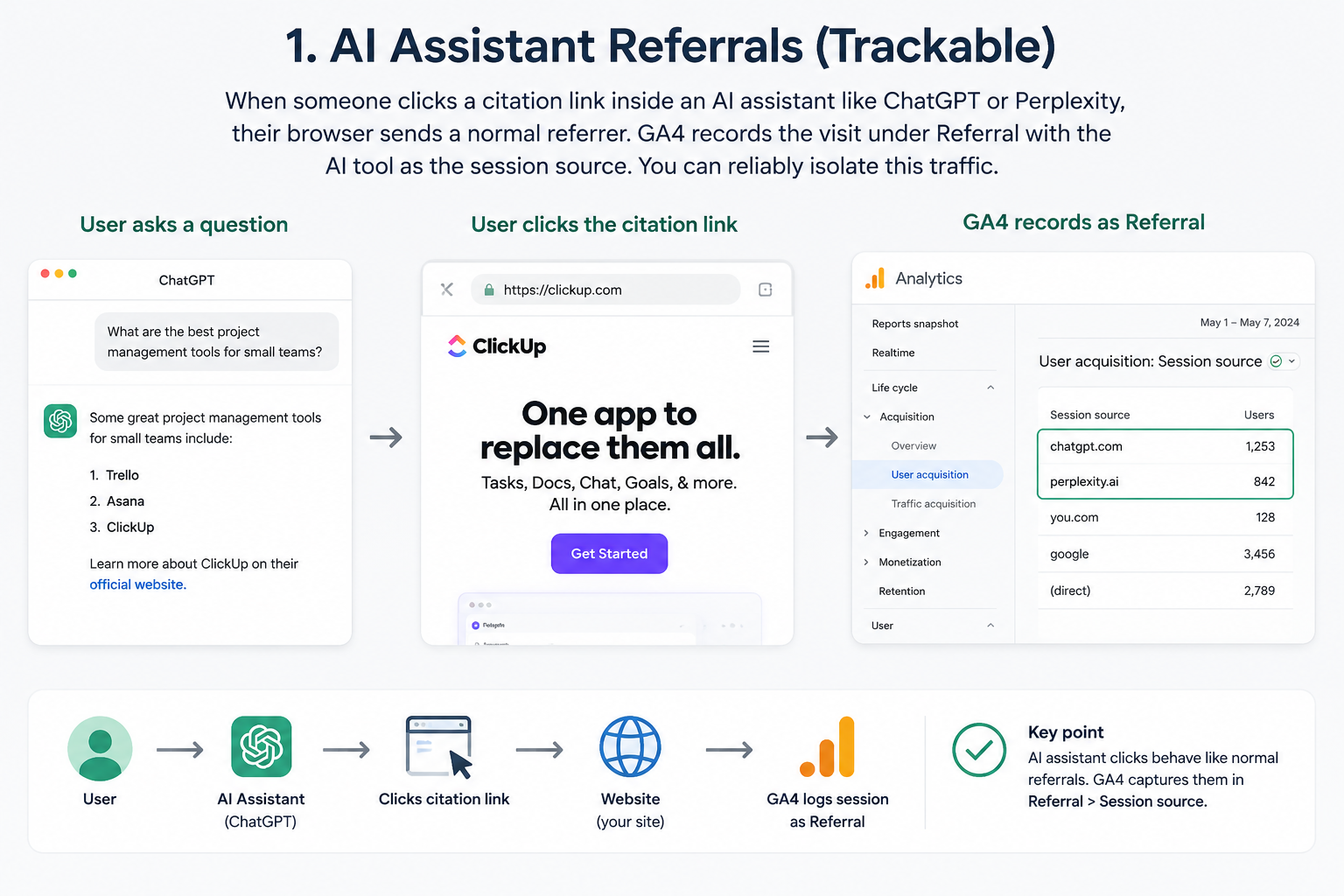
What you can isolate in GA4 is traffic from separate AI products, where the user leaves ChatGPT or Perplexity and arrives at your site with that domain as the referrer. That is a different thing from an AI Overview, and conflating the two is the most common mistake in this area.
The three kinds of AI traffic
Most guides split this into two. There are three, and they behave differently.
|
Type |
Example |
Where it lands |
Can you isolate it? |
|
AI assistant referral |
Someone reads your page because ChatGPT or Perplexity linked it |
Referral, or GA4’s AI Assistant channel |
Yes, mostly |
|
AI Overview click |
Someone clicks a citation inside an AI Overview on a Google results page |
Organic Search |
No, impressions only via Search Console |
|
AI Mode click |
Someone clicks a link inside Google’s AI Mode tab |
Organic Search |
No, impressions only via Search Console |
AI Overviews and AI Mode are both Google surfaces and both report as organic. They are reported together in Search Console’s generative AI report, which is why you cannot split AI Overviews from AI Mode either.
What changed in 2026
If you set up AI tracking before this year, three things have moved.
|
Change |
Date |
What it means for you |
|
GA4 added a native AI Assistant channel |
13 May 2026 |
You no longer need a custom channel group for the major assistants |
|
Search Console launched a generative AI performance report |
3 June 2026, worldwide by 31 August 2026 |
You can finally see AI Overview and AI Mode impressions |
|
AI assistant referrers kept multiplying |
Ongoing |
Any regex you wrote last year is now incomplete |
Method 1: Use GA4’s AI Assistant channel
Since 13 May 2026, when GA4 recognises a referrer as an AI assistant it automatically applies three values:
- Default Channel Group: AI Assistant
- Session medium: ai-assistant
- Session campaign: (ai-assistant)
Nothing to configure. Go to Reports, then Acquisition, then Traffic acquisition, and look for AI Assistant in the channel list.
What it misses, and this matters. Perplexity is not included in the native channel and still lands in Referral. Perplexity tends to send some of the highest-intent traffic of any AI source, so a report built only on the native channel understates your best AI audience. Smaller and newer assistants are also absent.
So treat the native channel as a floor, not a complete picture.
Method 2: Extend it with a custom channel group
Build your own group to catch what the native one misses. In Admin, go to Data display, then Channel groups, then create a new group above the default.
Set the condition to Source matches regex:
chatgpt\.com|chat\.openai\.com|openai\.com|perplexity\.ai|gemini\.google\.com|
bard\.google\.com|copilot\.microsoft\.com|copilot\.cloud\.microsoft|
m365\.cloud\.microsoft|claude\.ai|you\.com|poe\.com|deepseek\.com|grok\.com|
x\.ai|mistral\.ai|phind\.com|kagi\.com|andisearch\.com|meta\.ai|qwen\.ai|
felo\.ai|genspark\.ai|komo\.ai|iask\.ai|liner\.com
Three things to know before you paste that in.
This is a list of domains commonly seen in referral reports, not an official list from Google. New assistants appear constantly and old ones change domains. Check your own Referral report for unfamiliar domains once a quarter and add them.
Custom channel groups apply going forward and to a limited window of past data, so do not expect a full historical rebuild.
Keep your custom group above the default so it takes precedence, and name it something unambiguous like AI Assistant (extended) so nobody confuses it with Google’s native channel six months from now.
If GA4 itself is not yet set up properly, fix that first. Our GA4 setup guide covers the configuration this depends on, and reading website insights in Google Analytics covers the reports themselves.
Method 3: Search Console’s generative AI report, for AI Overviews
This is the tool that actually addresses AI Overviews, and it is the part most guides have not caught up with.
Google launched the generative AI performance report on 3 June 2026 and completed the worldwide rollout by 31 August 2026. Every site has it now.
What it gives you. Impressions, recorded when a link to your site is rendered visibly inside an AI-generated response block, whether that is an inline link, a citation card, a footnote anchor or a carousel item. You can break impressions down by page, country, device and date.
What it does not give you. No clicks. No click-through rate. No queries. At launch there is no click data for the AI surfaces at all, so you can establish that you were cited and on which pages, but not whether anyone came through.
That sounds limited, and it is, but it answers the question that matters most for AI visibility work: which of your pages are being used as sources. Rising impressions on a page means the models are citing it more. That is the metric to act on, and it is the same metric that generative engine optimisation is trying to move.
How to use it in practice. Pull impressions by page monthly. Cross-reference against your organic clicks for the same pages in the standard Performance report. A page with climbing AI impressions and flat clicks is being used as a source without being visited, which is the defining pattern of this era and a reason to make sure your brand name and offer appear in the cited passage itself.
Method 4: Catch some AI Overview clicks with GTM and text fragments
A partial workaround, and worth being honest about how partial.
When Google links into a page from certain surfaces, the URL can carry a text fragment, the #:~:text= portion, which scrolls the user to the quoted passage. You can capture this in Google Tag Manager and send it to GA4 as an event.
Create a Custom JavaScript variable:
function() {
var h = window.location.hash || ”;
return h.indexOf(‘:~:text=’) > –1 ? h : undefined;
}
Fire a GA4 event on page view when that variable is defined, and send the fragment as a parameter. Register the parameter as a custom dimension in GA4 so it appears in reports.
The limits, plainly. Text fragments are not exclusive to AI Overviews, so some hits are featured snippets or ordinary deep links. Not every AI Overview click carries one. The hash never reaches the server, so this only works client-side and only when JavaScript runs. Treat the result as a directional signal about which passages get quoted, never as a count of AI Overview clicks.
What it is genuinely good for is seeing which sentences of yours get quoted. That tells you what to write more of, which feeds directly into semantic SEO work.
Method 5: Reconcile the Direct traffic
A large share of AI assistant traffic arrives with no referrer at all and lands in Direct. It happens because many assistants run in apps rather than browsers, strip the referrer, or open links in an in-app webview.
Loamly’s State of AI Traffic 2026 benchmark report, built on an analysis of more than 446,000 website visits, found that 70.6% of AI-driven traffic arrives with no referrer header, leaving only 29.4% carrying a referrer an analytics tool can recognise. So roughly seven in ten AI visits are sitting in your Direct bucket right now.
You cannot recover the source, but you can watch for the pattern. Segment Direct sessions by landing page. Direct traffic arriving on a deep article URL, rather than your homepage, is almost never genuinely direct, because nobody types a long blog URL from memory. A rising trend of deep-page Direct sessions, alongside rising AI impressions in Search Console for those same pages, is reasonable circumstantial evidence of AI traffic.
Document that you are inferring it. Do not put it in a report as measured fact.
What you still cannot measure
Stating this clearly saves everyone time:
- AI Overview clicks as a number. Impressions only.
- Which query triggered an AI Overview that cited you. The generative AI report has no query dimension.
- Whether being cited without a click had any value. No tool connects an uncited brand impression to a later conversion.
- AI Overviews separately from AI Mode. They are reported together.
- What ChatGPT said about you. GA4 tracks the click, not the conversation. For that you need AI visibility monitoring, which is a different exercise from analytics.
Build a reporting view that survives the next change
Given how fast this moves, build something you will not have to rebuild in April.
Four numbers, monthly, in one place:
- AI Assistant sessions from GA4, using your extended channel group rather than the native one.
- Generative AI impressions from Search Console, with the top ten cited pages.
- Organic clicks on those same pages, from Search Console’s standard Performance report.
- Deep-page Direct sessions, as your inferred floor.
Then one derived ratio worth watching: generative AI impressions divided by organic clicks, per page. When it climbs, you are being used as a source more often than you are being visited. That is the signal to put your brand and your offer inside the passage the models quote rather than at the bottom of the page.
Keep a dated note of the methodology each time it changes. Everything in this field has a shelf life measured in months, and a report nobody can explain the provenance of gets ignored.
Frequently asked questions
Can you see AI Overview traffic separately in GA4?
No. Clicks from AI Overviews and AI Mode arrive with Google Search as the referrer and are classified as Organic Search. There is no setting or parameter that separates them. Search Console’s generative AI report shows AI Overview and AI Mode impressions, but no clicks.
Does GA4 have a built-in AI traffic channel?
Yes, since 13 May 2026. GA4 applies a Default Channel Group of AI Assistant, a session medium of ai-assistant and a campaign of (ai-assistant) when it recognises an AI assistant referrer. It does not cover Perplexity, which still lands in Referral, so extend it with a custom channel group.
What is the Search Console generative AI report?
A performance report launched on 3 June 2026 and rolled out worldwide by 31 August 2026. It shows impressions when your links appear inside AI Overviews or AI Mode, broken down by page, country, device and date. It does not include clicks, click-through rate or queries.
What is the difference between AI Overview traffic and AI assistant traffic?
An AI Overview click starts on a Google results page and reports as Organic Search. An AI assistant referral starts inside a separate product such as ChatGPT or Perplexity and arrives with that domain as the referrer, so it can be isolated. They need different tracking methods.
Why does AI traffic show up as Direct?
Many assistants run in apps or in-app webviews that strip the referrer, so the session arrives with no source. You cannot recover it. The practical check is to segment Direct sessions by landing page, since Direct sessions on deep article URLs are rarely genuinely direct.
Which referrer domains should my AI regex include?
At minimum: chatgpt.com, chat.openai.com, perplexity.ai, gemini.google.com, copilot.microsoft.com, claude.ai, deepseek.com, grok.com, you.com, poe.com and meta.ai. This is not an official list, so review your own Referral report quarterly and add new domains as they appear.
Can I track which of my sentences AI Overviews quote?
Partially, using the text-fragment method in Google Tag Manager. It captures the #:~:text= portion of inbound URLs, which reveals quoted passages. It is not exclusive to AI Overviews and does not fire on every click, so use it directionally.
Is Search Console or GA4 better for AI Overview visibility?
Search Console, for AI Overviews and AI Mode, because it is the only source of impression data for those surfaces. GA4 is better for AI assistant referrals. You need both, and they answer different questions.
Measure it, then move it
Tracking AI traffic in 2026 means accepting partial data and being clear about which part is which. Impressions from Search Console, referrals from GA4, and an honest inference on Direct. That combination tells you which pages the models rely on, which is the thing you can actually act on.
Acting on it is the next piece of work. If your pages are being cited but not visited, the fix is in how the page is written and structured, not in analytics. We cover the approach in how to get your Singapore business cited in ChatGPT, Gemini and Perplexity, the difference from classic search in GEO vs SEO, the technical entry point in llms.txt, and the publishing process in our AI content workflow.
If you would rather hand it over, that is our AI SEO and GEO service, and if you are shortlisting vendors we have mapped the GEO agencies in Singapore.